
📗 Terraform#
📑 Reading notes
ᐅ git clone https://github.com/daveprowse/tac-course.git
I - Install and Setup#
Visual Studio Keyboard Shortcuts
I.1 Install#
# Install autocomplete
ᐅ terraform -install-autocomplete
# or
ᐅ tofu -install-autocomplete
I.2 Setup AWS#
AWS console
Login to your AWS account console: https://console.aws.amazon.com
- Create Amazon AWS account here: https://aws.amazon.com/.
- Create a separate IAM user.
- Install
awsCLI.ᐅ aws --version aws-cli/2.33.11 Python/3.13.11 Linux/6.18.7-200.fc43.x86_64 exe/x86_64.fedora.43 ᐅ command -v aws /usr/local/bin/aws
- Create a new access key.
Configure
awsCLI.# Enter the new access key ᐅ aws configure ... # Check configuration ᐅ aws configure list NAME : VALUE : TYPE : LOCATION profile : <not set> : None : None access_key : **********NQMZ : shared-credentials-file : secret_key : **********sWNb : shared-credentials-file : region : <not set> : None : None # Credentials location ᐅ tree -p --noreport ~/.aws/ [drwxr-xr-x] /home/guisam/.aws/ ├── [-rw-------] config └── [-rw-------] credentials
Configure
awscompletion.autoload bashcompinit && bashcompinit autoload -Uz compinit && compinit complete -C '/usr/local/bin/aws_completer' aws
Update
.zshrcwith these lines.
II - Syntax and Help#
II.1 Naming Convention Syntax#
<block type> "<block label>" "<block label name>" {
  <identifier> = <expression>
}
block label name is the Terraform name, or Terraform ID.
II.2 Command help#
terraform -h <subcommand>
ᐅ awk 'NR==3||NR==4' <(tofu -h state rm)
  Remove one or more items from the OpenTofu state, causing OpenTofu to
  "forget" those items without first destroying them in the remote system.
II.3 Block Types#
terraform:Defines global settings for Terraform execution, such as required Terraform version and backend configuration for state storage.terraform { required_version = ">= 1.0.0" backend "s3" { bucket = "my-terraform-state" key = "terraform.tfstate" region = "us-west-2" } }
provider:Configures the cloud or SaaS provider (e.g., AWS, Azure) that Terraform will use to manage resources, including authentication and region settings.provider "aws" { region = "us-west-1" access_key = "YOUR_ACCESS_KEY" secret_key = "YOUR_SECRET_KEY" }
resource:Declares infrastructure resources (e.g., EC2 instances, VPCs) that Terraform will manage. Each block specifies a resource type, name, and configuration.resource "aws_instance" "web" { ami = "ami-0c55b159cbfafe1f0" instance_type = "t2.micro" }
data:Retrieves information from external sources (e.g., existing resources, AMIs, DNS records) to use in configuration.data "aws_ami" "latest_amazon_linux" { most_recent = true owners = ["amazon"] filter { name = "name" values = ["amzn2-ami-hvm-*-x86_64-gp2"] } }
module:Reuses pre-defined configurations (modules) from local directories or the Terraform Registry to promote code reuse and modularity.module "vpc" { source = "terraform-aws-modules/vpc/aws" version = "3.0.0" cidr_block = "10.0.0.0/16" }
variable:Defines input variables that allow customization of configurations across environments (e.g., instance count, region).variable "instance_count" { description = "Number of EC2 instances to create" type = number default = 1 }
output:Exposes values after terraform apply, such as public IP addresses or DNS names, for use in other configurations or external systems.output "instance_public_ip" { value = aws_instance.web.public_ip }
locals:Defines local variables to simplify complex expressions and avoid repetition within a configuration.locals { instance_tags = { Name = "web-server" Env = "prod" } }
dynamic:Generates repeated nested blocks (e.g., security group rules) based on a collection of values, reducing code duplication.resource "aws_security_group" "example" { dynamic "ingress" { for_each = var.security_rules content { from_port = ingress.value.port to_port = ingress.value.port protocol = ingress.value.protocol cidr_blocks = ingress.value.cidr } } }
provisioner:Executes scripts or commands on local or remote machines after resource creation (e.g., software installation). Note: Use with caution due to potential security and reliability risks.resource "aws_instance" "web" { # ... other config provisioner "remote-exec" { inline = [ "sudo apt-get update", "sudo apt-get install -y nginx" ] } }
III - First Terraform Configuration with AWS#
registry.terraform.io/browse/providers
ᐅ mkdir first && cd first
ᐅ cat <<EOF > main.tf
terraform {
  required_providers {
    aws = {
      source  = "hashicorp/aws"
      version = "~> 4.16"
    }
  }

  required_version = ">= 1.2.0"
}

provider "aws" {
  region = "eu-west-3"
}

resource "aws_instance" "lesson_03" {
  ami           = "ami-0c7c4e3c6b4941f0f"
  instance_type = "t2.micro"

  tags = {
    Name = "Lesson-03-AWS-Instance"
  }
}
EOF
Initialize, format, validate and plan.
ᐅ tofu fmt
ᐅ tofu init
ᐅ fofu validate
ᐅ tofu plan -out /tmp/first.plan | grep -v "known after\|^$"
OpenTofu used the selected providers to generate the following execution
plan. Resource actions are indicated with the following symbols:
  + create
OpenTofu will perform the following actions:
  # aws_instance.lesson_03 will be created
  + resource "aws_instance" "lesson_03" {
      + ami                                  = "ami-0c7c4e3c6b4941f0f"
      + get_password_data                    = false
      + instance_type                        = "t2.micro"
      + source_dest_check                    = true
      + tags                                 = {
          + "Name" = "Lesson-03-AWS-Instance"
        }
      + tags_all                             = {
          + "Name" = "Lesson-03-AWS-Instance"
        }
      + user_data_replace_on_change          = false
    }
Plan: 1 to add, 0 to change, 0 to destroy.

─────────────────────────────────────────────────────────────────────────────
Saved the plan to: /tmp/first.plan
To perform exactly these actions, run the following command to apply:
    tofu apply "/tmp/first.plan"
Image id
# Add region
ᐅ aws configure
...
ᐅ aws configure list
NAME       : VALUE                    : TYPE             : LOCATION
profile    : <not set>                : None             : None
access_key : **********NQMZ     : shared-credentials-file :
secret_key : **********sWNb     : shared-credentials-file :
region     : eu-west-3                : config-file      : ~/.aws/config
# find AMIs
ᐅ aws ec2 describe-images --owners amazon --output table
ᐅ aws ec2 describe-images --filters "Name=name,Values=ubuntu*" --output table
ᐅ aws ec2 describe-instance-types \
--filters Name=free-tier-eligible,Values=true \
--query "InstanceTypes[*].[InstanceType]" --output text | sort
c7i-flex.large
m7i-flex.large
t3.micro
t3.small
t4g.micro
t4g.small
# fix ami
ᐅ sed -i 's/t2/t3/g' main.tf
# plan and apply
ᐅ tofu plan -out /tmp/first.plan
ᐅ tofu apply "/tmp/first.plan"
ᐅ tofu destroy
ᐅ aws ec2 describe-instances --region eu-west-3 | \
jq '.Reservations[0].Instances[0].State'
{
  "Code": 48,
  "Name": "terminated"
}
IV - AWS Configuration with Security Groups#
Get AMI id and name
ᐅ aws ec2 describe-images \
    --filters "Name=free-tier-eligible,Values=true" \
    --query "Images[*].[ImageId, Name]" \
    --output text | awk 'NR==1{print;print "..."}END{print}'
ami-00069ab799c98014c   aws-elasticbeanstalk-amzn-2023.3.20240219.64bit-eb_tomcat9corretto17_amazon_linux_2023-hvm-2024-02-20T16-23
...
ami-0feb66f57293a188d   TRANSFORMER_CSP_AMI_R5.9.0-SNAPSHOT-2.12-092324_213338
Update main.tf
terraform {
  required_providers {
    aws = {
      source  = "hashicorp/aws"
      version = "~> 4.16"
    }
  }

  required_version = ">= 1.2.0"
}

provider "aws" {
  region = "eu-west-3"
}

resource "aws_instance" "lesson_04" {
  ami           = "ami-050352a65e954abb1"
  instance_type = "t3.micro"
  vpc_security_group_ids = [
    aws_security_group.sg_ssh.id,
    aws_security_group.sg_https.id
  ]

  tags = {
    Name      = "Lesson-04-VM-SG"
  }
}

resource "aws_security_group" "sg_ssh" {
  ingress {
    cidr_blocks = ["0.0.0.0/0"]
    protocol    = "tcp"
    from_port   = 22
    to_port     = 22
  }

  egress {
    cidr_blocks = ["0.0.0.0/0"]
    protocol    = "-1"
    from_port   = 0
    to_port     = 0
  }
}

resource "aws_security_group" "sg_https" {
  ingress {
    cidr_blocks = ["192.168.0.0/16"]
    protocol    = "tcp"
    from_port   = 443
    to_port     = 443
  }

  egress {
    cidr_blocks = ["0.0.0.0/0"]
    protocol    = "-1"
    from_port   = 0
    to_port     = 0
  }
}
ᐅ tofu plan -out /tmp/first.plan
ᐅ tofu apply "/tmp/first.plan"
V - AWS Configuration with SSH and Outputs#
Split main.tf file, create directories and ssh keys, plan, apply and check ssh connection.
ᐅ ssh-keygen -t ed25519 -a 100 -f keys/aws_key
ᐅ tree --noreport -p first
[drwxr-xr-x]  first
├── [drwxr-xr-x]  instances
│   ├── [-rw-r--r--]  main.tf
│   ├── [-rw-r--r--]  outputs.tf
│   ├── [-rw-r--r--]  provider.tf
│   └── [-rw-r--r--]  version.tf
└── [drwxr-xr-x]  keys
    ├── [-rw-------]  aws_key
    └── [-rw-r--r--]  aws_key.pub
main.tf
resource "aws_instance" "lesson_05" {
  ami           = "ami-00634bca710e8ccb1"
  instance_type = "t3.micro"
  key_name      = "aws_key"
  vpc_security_group_ids = [
    aws_security_group.sg_ssh.id,
    aws_security_group.sg_https.id,
    aws_security_group.sg_http.id
  ]

  tags = {
    Name = "Lesson_05"
  }
}

resource "aws_key_pair" "deployer" {
  key_name   = "aws_key"
  public_key = "ssh-ed25519 AAAAC3NzaC1lZDI1NTE5AAAAILY0hgaYp8uMLJ+B6WXkQ3dJg1Ci2LMWLiO4K0gtaohK guisam@guisam-thinkpad"
}

resource "aws_security_group" "sg_ssh" {
  ingress {
    cidr_blocks = ["0.0.0.0/0"]
    protocol    = "tcp"
    from_port   = 22
    to_port     = 22
  }

  egress {
    cidr_blocks = ["0.0.0.0/0"]
    protocol    = "-1"
    from_port   = 0
    to_port     = 0
  }
}

resource "aws_security_group" "sg_https" {
  ingress {
    cidr_blocks = ["192.168.0.0/16"]
    protocol    = "tcp"
    from_port   = 443
    to_port     = 443
  }

  egress {
    cidr_blocks = ["0.0.0.0/0"]
    protocol    = "-1"
    from_port   = 0
    to_port     = 0
  }
}

resource "aws_security_group" "sg_http" {
  ingress {
    cidr_blocks = ["0.0.0.0/0"]
    protocol    = "tcp"
    from_port   = 80
    to_port     = 80
  }

  egress {
    cidr_blocks = ["0.0.0.0/0"]
    protocol    = "-1"
    from_port   = 0
    to_port     = 0
  }
}
outputs.tf
output "public_dns" {
  description = "DNS name of the EC2 instance"
  value       = aws_instance.lesson_05.public_dns
}

output "public_ip" {
  description = "Public IP address of the EC2 instance"
  value       = aws_instance.lesson_05.public_ip
}
provider.tf
provider "aws" {
  region = "eu-west-3"
}
version.tf
terraform {
  required_providers {
    aws = {
      source  = "hashicorp/aws"
      version = "~> 4.20"
    }
  }
version.tf
terraform {
  required_providers {
    aws = {
      source  = "hashicorp/aws"
      version = "~> 4.20"
    }
  }

  required_version = ">= 1.2.8"
}
ᐅ ssh -i keys/aws_key ec2-user@13.36.237.195
VI - Terraform with cloud-init and Viewing Resources#
# find occurences
ᐅ sed -n '/05/p' *.tf
resource "aws_instance" "lesson_05" {
    Name = "Lesson_05"
  value       = aws_instance.lesson_05.public_dns
  value       = aws_instance.lesson_05.public_ip
# check substitution
ᐅ sed -n 's/05/06/p' *.tf
resource "aws_instance" "lesson_06" {
    Name = "Lesson_06"
  value       = aws_instance.lesson_06.public_dns
  value       = aws_instance.lesson_06.public_ip
# apply substitution
ᐅ sed -i '/s/O5/06/g' *.tf
Create a new ssh keys
ᐅ tree --noreport first
first
├── instances
│   ├── main.tf
│   ├── outputs.tf
│   ├── provider.tf
│   ├── terraform.tfstate
│   ├── terraform.tfstate.backup
│   └── version.tf
├── keys
│   ├── aws_key
│   ├── aws_key.pub
│   ├── spiderman_key
│   └── spiderman_key.pub
└── scripts
    └── apache-mkdocs.yaml
ᐅ ssh-keygen -t ed25519 -a 100 -f keys/spiderman_key -C "Spiderman"
add cloud-init config
apache-mkdocs.yamlin a new directoryscripts
apache-mkdocs.yaml
#cloud-config-mkdocs-system

groups:
  - dpro42-group

users:
  - default
  - name: spiderman
    gecos: Peter Parker
    shell: /bin/bash
    primary_group: dpro42-group
    sudo: ALL=(ALL) NOPASSWD:ALL
    groups: users, admin
    lock_passwd: false
    ssh_authorized_keys:
      - ssh-ed25519 AAAAC3NzaC1lZDI1NTE5AAAAIFXSoAya3j3FMLlFrtwdnL4LwFfAAz1rON2fTZCR0n0m Spiderman

runcmd:
  - touch /home/spiderman/hello.txt
  - echo "Hello! and welcome to this server! Destroy me when you are done!" >> /home/spiderman/hello.txt
  - sudo apt-get update
  - sudo apt install apache2 -q -y
  ## 4/1/2025: replaced pip install of mkdocs with apt-get install
  # old - sudo apt install python3-pip -y
  # old - sudo pip install mkdocs
  - sudo apt-get install mkdocs -q -y
  - sudo mkdir /home/spiderman/mkdocs
  - cd /home/spiderman/mkdocs
  - sudo mkdocs new mkdocs-project
  - cd mkdocs-project
  - sudo mkdocs build
  - sudo rm /var/www/html/index.html
  - sudo cp -R site/* /var/www/html
  - sudo systemctl restart apache2
Update
aws_instanceresource.
main.tf
ᐅ grep 'ami \|user_data' main.tf
  ami           = "ami-0808dd1ba12547041"
  user_data     = file("../scripts/apache-mkdocs.yaml")
Check ssh and http connection (
<ipaddress>from the apply outputs).
ᐅ ssh -i keys/spiderman_key spiderman@13.39.161.126 sudo systemctl status apache2 | awk 'NR<15'
● apache2.service - The Apache HTTP Server
     Loaded: loaded (/usr/lib/systemd/system/apache2.service; enabled; preset: enabled)
     Active: active (running) since Sun 2026-02-01 18:02:25 UTC; 14min ago
 Invocation: 9159ed7f60414e4baffa0f26b10d381d
       Docs: https://httpd.apache.org/docs/2.4/
    Process: 2651 ExecStart=/usr/sbin/apachectl start (code=exited, status=0/SUCCESS)
   Main PID: 2655 (apache2)
      Tasks: 55 (limit: 1097)
     Memory: 8.6M (peak: 9.1M)
        CPU: 118ms
     CGroup: /system.slice/apache2.service
             ├─2655 /usr/sbin/apache2 -k start
             ├─2657 /usr/sbin/apache2 -k start
             └─2659 /usr/sbin/apache2 -k start

ᐅ curl -I http://13.39.161.126
HTTP/1.1 200 OK
Date: Sun, 01 Feb 2026 18:17:54 GMT
Server: Apache/2.4.66 (Debian)
Last-Modified: Sun, 01 Feb 2026 18:02:25 GMT
ETag: "1b8a-649c7023d9dbe"
Accept-Ranges: bytes
Content-Length: 7050
Vary: Accept-Encoding
Content-Type: text/html
VII - Variables#
VII.1 Introduction to Terraform variables#
Variable:
a symbolic name associated with a value;
declared with
variableblock;referenced with
var.<variable_name>
Variables allows you to write more flexible and reusable configurations. Main objective: end users only change variables and don’t access infrastructure code.
VII.2 Define and Reference Variables#
Create variables.tf.
variable "instance_name" {
  description = "Name tag of the instance"
  type = string
  default = "Lesson-07"
}

variable "ami_id" {
  description = "Amazon image ID"
  type = string
  default = "ami-0808dd1ba12547041"
}

variable "instance_type" {
  description = "Instance type"
  type = string
  default = "t3.micro"
}
Update main.tf.
ᐅ grep var\. main.tf
  ami           = var.ami_id
  instance_type = var.instance_type
    Name = var.instance_name
ᐅ sed -i 's/06/07/g' *.tf
VII.3 Using -var to Specify Values#
ᐅ tofu plan -var "instance_name=turlututu"
ᐅ tofu plan -var "instance_name=turlututu" \
  -var "instance_type=t2.nano" | grep -v "known after apply\|^$"
VII.4 Specifying Values in the CLI#
Comment a default line and plan/apply. You will be asked for value.
Remember the value (you will be required to type it when destroy).
ᐅ grep "#" variables.tf
#  default = "Lesson-07"

ᐅ tofu plan -out /tmp/first.plan
var.instance_name
  Name tag of the instance

  Enter a value:
VII.5 Using .tfvars Files#
terraform.tfvars houses values only, whereas variables.tf can have declarations and values.tfvars file should be used with -var-file.ᐅ cat dev.tfvars
instance_name="vm_course_07"
ᐅ tofu plan -out /tmp/first.plan -var-file dev.tfvars | \
grep -v "known after\|^$"
*.auto.tfvars or *.auto.tfvars.json are automatically loaded.
ᐅ mv dev.tfvars dev.auto.tfvars
ᐅ tofu plan -out /tmp/first.plan
Best Practice: Use *.auto.tfvars for modular, environment-specific configurations
(e.g., ec2.auto.tfvars for EC2-related variables). Never commit sensitive data to version control.
Use .gitignore and secure alternatives like Vault or CI/CD secrets.
Note
variable can be empty.
ᐅ head -1 variables.tf
variable "instance_name" {}
ᐅ grep instance_name dev.auto.tfvars
instance_name = "vm_course_07"
VII.6 Environment Variables#
To use a TF_VAR environment variable:
- Declare the variable in your Terraform configuration using a variable block.
- Set the environment variable with the TF_VAR_ prefix followed by the variable name (e.g., TF_VAR_region=us-west-2).
Without AWS CLI configured, we can manage authentication with environent variables.
ᐅ cat provider.tf
provider "aws" {
  region = "eu-west-3"
  access_key = var.AWS_ACCESS_KEY
  secret_key = var.AWS_SEtf_public_modules.webpCRET_KEY
}
ᐅ head -2 variables.tf
variable "AWS_ACCESS_KEY" {}
variable "AWS_SECRET_KEY" {}
ᐅ export TF_VAR_AWS_ACCESS_KEY=xxx
ᐅ export TF_VAR_AWS_SECRET_KEY=xxx
VII.7 Variables Precedence#
Highest to lowest precedence:
-varand-var-fileoptions (used withtofu apply)*.auo.tfvarsor*.auto.tfvars.jsonterraform.tfvars.jsonterraform.tfvarsenvironment variables aka
TF_VARprefixed variables
VII.8 Speeding up Terraform Aliases#
Create command aliases.
alias ti="tofu init"
alias tp="tofu plan"
alias ta="tofu apply"
alias td="tofu destroy"
alias to="tofu output"
VIII - Modules#
VIII.1 Introduction to Terraform Modules#
developer.hashicorp.com - modules
Modules are reusable configurations and provides organization, encapsulation, reusable confgis and self-service.
VIII.3 Working with Public and Local Modules#
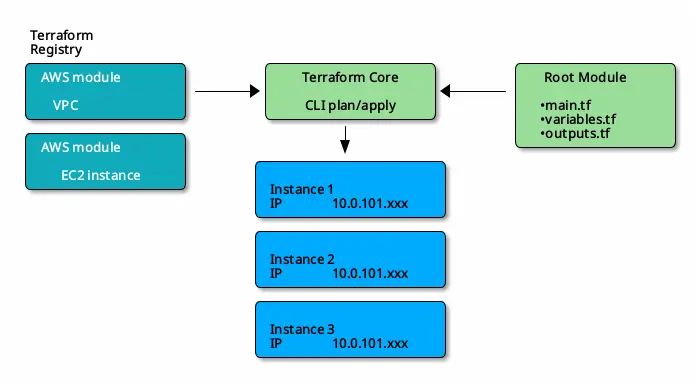
main.tf
terraform {
  required_providers {
    aws = {
      source  = "hashicorp/aws"
      version = ">= 6.28"
    }
  }

  required_version = ">= 1.9.0"
}

provider "aws" {
  region = "us-east-2"
}

module "vpc" {
  source = "terraform-aws-modules/vpc/aws"
  # To download the latest module, simply omit the version argument.
  version = "6.6.0"

  name = var.vpc_name
  cidr = var.vpc_cidr

  azs             = var.vpc_azs
  private_subnets = var.vpc_private_subnets
  public_subnets  = var.vpc_public_subnets

  enable_nat_gateway = var.vpc_enable_nat_gateway

  tags = var.vpc_tags
}

module "ec2_instances" {
  source  = "terraform-aws-modules/ec2-instance/aws"
  version = "6.2.0"

  name  = "Cluster-A-${count.index}"
  count = 3

  ami                    = "ami-097a2df4ac947655f"
  instance_type          = "t3.micro"
  vpc_security_group_ids = [module.vpc.default_security_group_id]
  subnet_id              = module.vpc.public_subnets[0]

  tags = {
    Terraform   = "true"
    Environment = "testing"
    Why         = "Because we can"
  }
}
outputs.tf
output "ec2_instance_private_ips" {
  description = "Private IP addresses of the EC2 instances"
  value       = module.ec2_instances.*.private_ip
}
variables.tf
variable "vpc_name" {
  description = "Name of VPC"
  type        = string
  default     = "example-vpc"
}

variable "vpc_cidr" {
  description = "CIDR block for VPC"
  type        = string
  default     = "10.0.0.0/16"
}

variable "vpc_azs" {
  description = "Availability zones for VPC"
  type        = list(string)
  default     = ["us-east-2a", "us-east-2b", "us-east-2c"]
}

variable "vpc_private_subnets" {
  description = "Private subnets for VPC"
  type        = list(string)
  default     = ["10.0.1.0/24", "10.0.2.0/24"]
}

variable "vpc_public_subnets" {
  description = "Public subnets for VPC"
  type        = list(string)
  default     = ["10.0.101.0/24", "10.0.102.0/24"]
}

variable "vpc_enable_nat_gateway" {
  description = "Enable NAT gateway for VPC"
  type        = bool
  default     = true
}

variable "vpc_tags" {
  description = "Tags to apply to resources created by VPC module"
  type        = map(string)
  default = {
    Terraform   = "true"
    Environment = "testing"
  }
}
Download modules.
ᐅ tofu get
Downloading registry.opentofu.org/terraform-aws-modules/ec2-instance/aws 6.2.0 for ec2_instances...
- ec2_instances in .terraform/modules/ec2_instances
Downloading registry.opentofu.org/terraform-aws-modules/vpc/aws 6.6.0 for vpc...
- vpc in .terraform/modules/vpc
ᐅ tree -L 2 --noreport .terraform
.terraform
└── modules
    ├── ec2_instances
    ├── modules.json
    └── vpc
ᐅ tofu init
ᐅ tofu plan -out /tmp/public.plan | grep "#.*will be created\|Plan:"
 # module.ec2_instances[0].aws_instance.this[0] will be created
 # module.ec2_instances[0].aws_security_group.this[0] will be created
 # module.ec2_instances[0].aws_vpc_security_group_egress_rule.this["ipv4_default"] will be created
 # module.ec2_instances[0].aws_vpc_security_group_egress_rule.this["ipv6_default"] will be created
 # module.ec2_instances[1].aws_instance.this[0] will be created
 # module.ec2_instances[1].aws_security_group.this[0] will be created
 # module.ec2_instances[1].aws_vpc_security_group_egress_rule.this["ipv4_default"] will be created
 # module.ec2_instances[1].aws_vpc_security_group_egress_rule.this["ipv6_default"] will be created
 # module.ec2_instances[2].aws_instance.this[0] will be created
 # module.ec2_instances[2].aws_security_group.this[0] will be created
 # module.ec2_instances[2].aws_vpc_security_group_egress_rule.this["ipv4_default"] will be created
 # module.ec2_instances[2].aws_vpc_security_group_egress_rule.this["ipv6_default"] will be created
 # module.vpc.aws_default_network_acl.this[0] will be created
 # module.vpc.aws_default_route_table.default[0] will be created
 # module.vpc.aws_default_security_group.this[0] will be created
 # module.vpc.aws_eip.nat[0] will be created
 # module.vpc.aws_eip.nat[1] will be created
 # module.vpc.aws_internet_gateway.this[0] will be created
 # module.vpc.aws_nat_gateway.this[0] will be created
 # module.vpc.aws_nat_gateway.this[1] will be created
 # module.vpc.aws_route.private_nat_gateway[0] will be created
 # module.vpc.aws_route.private_nat_gateway[1] will be created
 # module.vpc.aws_route.public_internet_gateway[0] will be created
 # module.vpc.aws_route_table.private[0] will be created
 # module.vpc.aws_route_table.private[1] will be created
 # module.vpc.aws_route_table.public[0] will be created
 # module.vpc.aws_route_table_association.private[0] will be created
 # module.vpc.aws_route_table_association.private[1] will be created
 # module.vpc.aws_route_table_association.public[0] will be created
 # module.vpc.aws_route_table_association.public[1] will be created
 # module.vpc.aws_subnet.private[0] will be created
 # module.vpc.aws_subnet.private[1] will be created
 # module.vpc.aws_subnet.public[0] will be created
 # module.vpc.aws_subnet.public[1] will be created
 # module.vpc.aws_vpc.this[0] will be created
 Plan: 35 to add, 0 to change, 0 to destroy.
 ᐅ tofu apply "/tmp/public.plan"
 ᐅ tofu destroy
IX - Logging#
Log immediately in the terminal:
TF_LOG=TRACE terraform applyThe five Terraform logging levels are:TRACE, DEBUG, INFO, WARN, ERRORNote that TRACE has the highest level of verbosity and ERROR has the lowest.Log to file:
export TF_LOG_PATH=logs.txt
Note
Turn on logging for entire terminal session
export TF_LOG=TRACE
TF_LOG subsets allow you to control logging for specific components of Terraform, enabling targeted debugging without overwhelming output.
These subsets are defined using environment variables that target specific subsystems:
TF_LOG_CORE: Enables logging for the Terraform binary only (excluding providers).TF_LOG_PROVIDER: Enables logging for all providers and provider SDKs used during the run.TF_LOG_PROVIDER_{PROVIDER_NAME}(e.g., TF_LOG_PROVIDER_AWS): Enables logging for a specific provider only.TF_LOG_SDK: Controls logging for provider SDKs (e.g., terraform-plugin-log).TF_LOG_SDK_PROTO: Logs protocol-level interactions for providers built on terraform-plugin-go.TF_LOG_SDK_FRAMEWORK: Logs for the terraform-plugin-framework.TF_LOG_SDK_HELPER_SCHEMA: Logs from the terraform-plugin-sdk/v2 helper/schema package.TF_LOG_SDK_MUX: Logs from the terraform-plugin-mux.
Important
TF_LOG takes precedence over all other logging variables.TF_LOG is set, it overrides any subset settings.terraform apply -refresh-only updates your Terraform state file to match
the current state of your infrastructure without making any changes to the deployed resources.
Create IAM users to check everything is fine.
main.tf
terraform {
  required_providers {
    aws = {
      source  = "hashicorp/aws"
      version = "6.30.0"
    }
  }

  required_version = ">= 1.11.0"
}

provider "aws" {
  region = "eu-west-3"
}

resource "aws_iam_user" "test_user" {
  name  = "user-${count.index}"
  count = 3
  tags = {
    time_created = timestamp()
    department   = "OPS"
  }
}

# resource "aws_iam_user" "test_user_2" {
#   name = "test-user-2"
# }

# This outputs the name of all users created
output "Name_of_all_users" {
  value = aws_iam_user.test_user[*].name
}

# # This outputs the name of the first user
# output "Name_of_the_first_user" {
#   value = aws_iam_user.test_user[0].name
# }

# #This outputs all element information about the second user
# output "All_info_about_the_element_0" {
#   value = element(aws_iam_user.test_user, 1)
# }
X - Working More with Providers#
XI - Terraform language#
XI.1 - Expressions#
Terraform expressions are the core mechanism for defining dynamic values, performing computations, and applying logic within Terraform configurations. They allow you to reference variables, compute values, and conditionally assign results, making your Infrastructure as Code (IaC) more flexible and reusable.
Key Types of Terraform Expressions:
References: Access values from variables, local values, resources, or data sources (e.g., var.instance_type, aws_instance.web.id).
Literal Values: Represent basic data types like strings (“hello”), numbers (42), booleans (true), and null.
Arithmetic & Logical Operators: Perform math (+, -, *, /) and boolean logic (&&, ||, !).
Conditional Expressions: Use the condition ? true_value : false_value syntax to choose values based on a condition.
For Expressions: Iterate over lists, maps, sets, or objects to transform data (e.g., [for name in var.names : upper(name)]).
Splat Expressions: Concisely extract attributes from a list of objects (e.g., aws_instance.web[*].id).
Function Calls: Use built-in functions like length(), join(), format(), or file() to manipulate data.
String Templates: Embed expressions in strings using ${} or %{ if }…%{ endif } directives.
tip
Use terraform console to test expressions interactively and debug logic before applying configurations.
XI.2 - Meta-Arguments#
Meta-arguments are special, built-in arguments that can be used with any resource or module block to control how Terraform creates, manages, updates, or destroys infrastructure. Unlike resource-specific arguments (like ami for aws_instance), meta-arguments apply universally across all resource types and providers.
count:Creates multiple instances of a resource based on a number. Each instance is assigned a unique index (count.index), useful for simple, sequential replication (e.g., creating 3 EC2 instances).Limitation: Removing an instance from the middle causes index shifting, leading to unnecessary recreation.for_each:Creates multiple instances based on a map or set of strings, providing more flexibility than count. Each instance is uniquely identified by a key, making it ideal for resources with distinct names or configurations (e.g., different AMIs for web, db, cache servers).Advantage: Avoids index shifting issues and supports meaningful identifiers.depends_on:Explicitly defines dependencies between resources when Terraform cannot infer them automatically. Ensures one resource is created or destroyed before another, critical for ordering tasks like bootstrapping or API timing issues.lifecycle:Controls resource lifecycle behavior, such as prevent_destroy (to protect against accidental deletion) or create_before_destroy (for zero-downtime updates).provider:Specifies which provider configuration to use for a resource, especially useful when multiple providers are defined (e.g., multiple AWS regions or multi-cloud environments).provisionerandconnection:Used to run scripts or commands after resource creation or destruction, withconnectiondefining how to connect (e.g., SSH) to the remote resource.